Picture this:
You’ve just launched your brand-new website. You picked the colours, wrote the content, added the photos, maybe even celebrated with a glass of wine. Then, excitedly, you go to Google… type your business name… hit search…
And nothing.
Not even page 10.
Not even page 20.
Your website does not appear anywhere in Google results; it like it has officially entered witness protection.
Before you panic or accuse Google of having something personal against you, take a breath.
One of the most common reasons websites “don’t show up” is incredibly simple:
Google hasn’t indexed your website yet.
So how can you fix that?
I promise to keep it so simple that even if you run a dog-grooming business in Manchester and have zero tech skills, you’ll get it.
Wait… What Does “Indexed” Even Mean?
Imagine Google as the world’s biggest librarian.
Every time a new website goes live, Google sends little digital “helpers” called crawlers to check it out. They read the pages, understand what the site is about, and decide where it should be placed in the vast library known as Google Search.
If your website isn’t indexed, Google simply hasn’t placed it on the shelf yet.
So when do people search for your business?
Google shrugs and says, “Never heard of it.”
 You might also like:
 Step 1: The Easiest Way to Check
Open a new Google tab and type:
site:yourwebsite.com
Example:
site:rockmybiz.com
If Google shows zero results, that means:
❌ Your website isn’t indexed
(but don’t worry, this is super common)
If Google shows pages from your site, then:
✔ Your website is indexed
but there’s another reason you’re not ranking
(SEO, content quality, no backlinks, we’ll get to that)
This simple “site:” trick might be one of the most underrated tools on the planet.
Quick, clean, accurate.
Step 2: Use Google Search Console
This part sounds scarier than it is.
Think of Google Search Console as the free dashboard for your website’s visibility.
If you haven’t set it up yet, do it now. It’s free, and it’s how you talk directly to Google.
Once logged in:
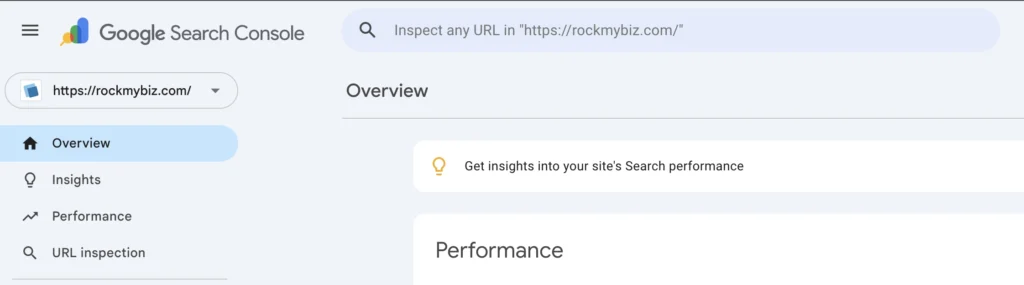
1. Paste your homepage URL into the top “Inspect any URL” bar
Example:
https://yourwebsite.com/
2. Google will instantly tell you:
Is your page indexed?
If not, why not?
Can Google crawl it?
Is anything blocking it?
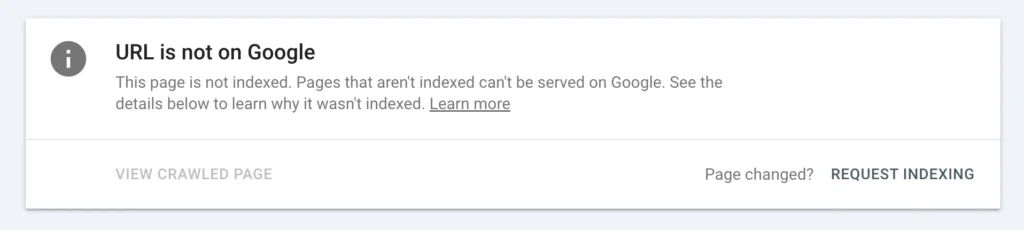
If it isn’t indexed, you’ll see a big message saying:
URL is not on Google
Annoying? Yes.
Helpful? Absolutely.
Because from here you can do the magic thing…
Step 3: Ask Google to Index Your Website
Inside Search Console, click:
“Request Indexing”
That’s it.
You’ve just tapped Google on the shoulder and said:
“Hey, could you please take a look at my site?”
Google doesn’t do it instantly, but it usually happens within a few hours to a few days.
Step 4: The Common Reasons Google Hasn’t Indexed Your Website Yet
If you’ve requested indexing and still see nothing after a while, you may have one of the classic beginner-friendly issues:
• Your website is too new
Brand-new sites sometimes take a week or two to appear.
• Your website blocks Google by mistake
A sneaky “noindex” tag or incorrect robots.txt file can hide your entire site.
• Your homepage has almost no content
Google doesn’t index empty pages, it wants something to understand.
• You don’t have any links pointing to your website
Links help Google discover new sites faster.
• Your site loads very slowly
If a website takes ages to load, Google gives up crawling it.
If you’re nodding right now thinking,
“Yep, that sounds like my website…”
don’t worry, that’s completely normal for small business owners doing everything themselves.
Step 5: Add Your Sitemap
Every website has (or should have) a sitemap.
It’s usually found here:
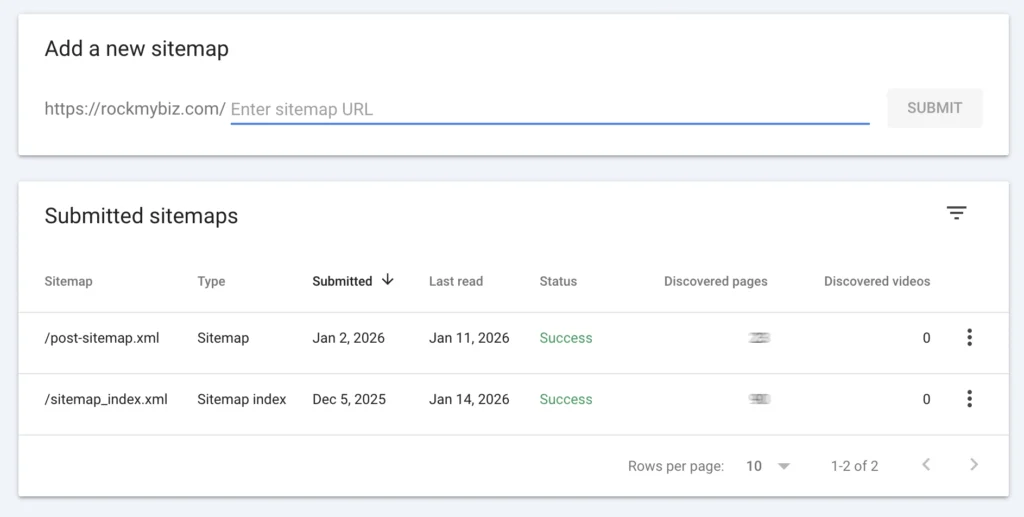
yourwebsite.com/sitemap.xml
Once you have it, go into Search Console:
Sitemaps → Add New Sitemap → Submit
This helps Google:
Understand your website structure
Discover pages faster
Index everything properly
It’s like handing the librarian your full book catalogue.
Step 6: Don’t Expect Instant Results
Many small business owners expect:
Website goes live
Google shows it the same day
Customers appear the next morning
But Google is more like a slow cooker than a microwave.
Indexing can take:
A few days for new websites
A week or two for brand-new domains
Longer if your site has technical issues
That’s why checking whether your website is indexed is the FIRST thing you should do before worrying about ranking, SEO, content, competitors, or anything else.
If Google Has Indexed Your Website… But You Still Aren’t Showing Up
Good news and bad news:
✔ Good news: Google knows you exist
❌ Bad news: You’re not competitive yet
This is usually because:
Your content is thin
Competitors have stronger websites
You have no backlinks
Your business name isn’t unique
Your site lacks helpful blog articles
Your Google Business Profile isn’t optimised
Your location isn’t clear to Google
This is where supporting content can help you, and yes, blog posts REALLY matter.
If you keep publishing valuable, helpful, beginner-friendly articles, Google starts trusting you more… and that trust becomes rankings.
Need Ideas for Blog Articles That Help Your SEO?
This is the part most people struggle with.
“What do I write about?”
“What topics should I cover?”
“What does my audience care about?”
And that’s exactly why I built the Blog Topic Ideas Generator, so you don’t have to guess.
👉 It gives you SEO-friendly topic ideas tailored to your business and your audience.
Perfect for beginners, and perfect for building the topical authority Google loves.
Try it here:
Blog Topic Ideas Generator
Final Thoughts: Don’t Panic — Just Check Your Indexing
Most small business owners think something is “wrong with Google” when they can’t find their website.
In reality, it’s almost always one of these:
Not indexed yet
Not submitted properly
Not enough content
Once you learn how to check indexing (which you now do!), everything else becomes 10x easier.
Give your website time.
Give Google something worth indexing.
And use tools that make the process simple.
Your audience will find you, and now you know how to help Google help you.